Cable Management Kit Under £30 UK: Tray, Clips & Labels
Affiliate disclosure: This article may contain affiliate links. If you buy through them, we may earn a commission at no extra cost to you.
Prices and availability checked: 12 May 2026. Prices can change quickly, so check the retailer page before buying.
A tidy home-office desk usually needs fewer cable accessories than the product listings suggest. For most cable management kit uk setups under £30, the useful core is a small tray, reusable ties, adhesive clips and simple plug labels.
The aim is not to hide every cable forever. It is to get the extension lead off the floor, stop charger cables falling behind the desk, leave safe slack for movement, and make the setup easy to reset when you swap a laptop, lamp or monitor.
If you are tidying a sit-stand setup, start with our standing desk guide first so the cable route works at both seated and standing height. If the desk itself is the space problem, the compact desk guide will help you choose a surface with enough depth for clean routing. For visible desk styling, pair this with the ideas in our minimalist office decor guide.
TL;DR: Build a simple under-£30 kit around the number of cables you actually use: clips for one or two leads, a tray for extension leads and power bricks, labels for shared or hidden plugs.
- Fixed desk: add a small under-desk tray, bundle spare cable length, and label each plug.
- Standing desk: prioritise a cable tray and slack loop so nothing pulls at full height.
- Rental home: use clamp-on trays and removable clips rather than drilling or strong permanent adhesive.
- Living room desk: hide the extension lead first, then route visible charger leads to the rear edge.
- Shared family desk: use labels so plugs do not get pulled out by mistake.
Best place to start: buy a tray first, then add ties, clips and labels only where needed. The IKEA FÖRSÄSONG tray is the cheapest tidy starting point if it fits your desk, while the D-Line 4-in-1 kit is useful when you mainly need clips, sleeves and reusable ties.
Cable Management Kit UK: What to Buy First
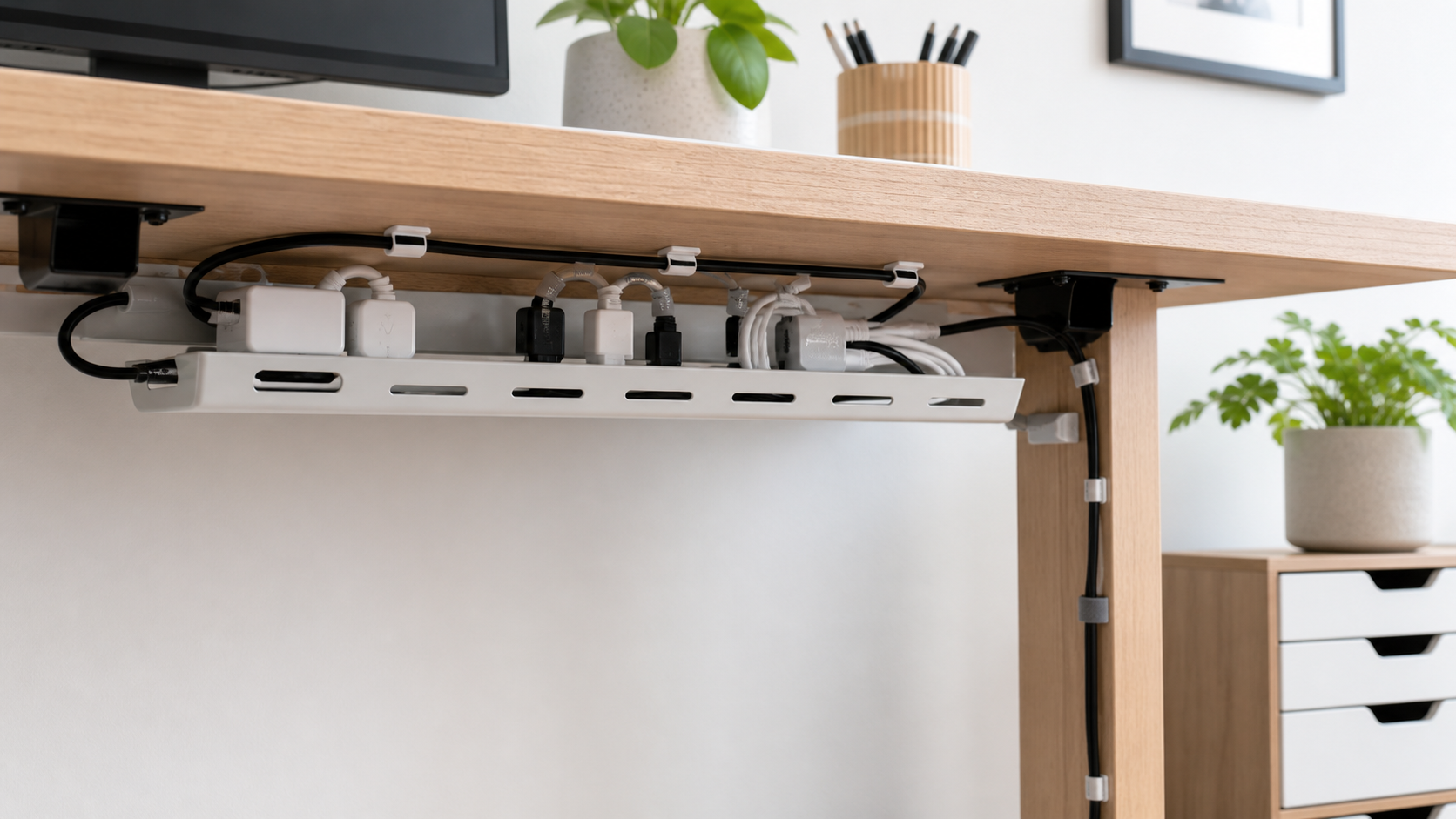
The best starting point is a tray, because it solves the biggest visual and safety problem: the extension lead and power bricks sitting on the floor. A small tray under the rear of the desk keeps plugs lifted, easier to dust around, and less likely to be kicked when you move the chair.
Reusable hook-and-loop ties come next. They are better than permanent zip ties for a home office because chargers, monitors and laptop docks change over time. You can tighten them neatly, then reopen them when you move the desk or add a new device.
Adhesive clips and labels are the finishing layer. Clips stop daily-use cables falling behind the desk, while labels make it obvious which plug belongs to the monitor, lamp, laptop charger or speaker. This is especially useful when the extension lead is hidden in a tray.
Choose by Cable Count
If you only have one or two cables, such as a laptop charger and lamp, skip the full kit and use adhesive clips or reusable ties to route the leads along the rear edge. A tray can be overkill when there is no extension lead or power brick to lift off the floor.
Once you have three to five cables, a tray becomes the better first buy. This usually means a monitor, laptop charger, lamp, speaker or dock all meeting near the same wall socket. The tray holds the extension lead and power bricks; ties deal with spare length; clips only guide the cables you touch daily.
For six or more cables, labels stop the setup becoming a guessing game. Label plugs before hiding them, especially on shared desks or family workstations where someone may unplug the wrong thing. A sleeve only helps if several visible cables drop together in the same direction.
Under-£30 Shopping List
| Item | Typical budget | Use it for | Worth buying? |
|---|---|---|---|
| Small cable tray | £6-£18 | Holding an extension lead and power bricks | Yes, buy first |
| Reusable hook-and-loop ties | £3-£6 | Bundling spare cable length without permanent zip ties | Yes |
| Adhesive cable clips or bases | £3-£6 | Routing charger and lamp cables along the rear edge | Yes, especially for small desks |
| Plug labels | £2-£5 | Identifying plugs once the extension lead is hidden | Yes |
| Cable sleeve | £5-£10 | Wrapping several visible cables that drop together | Optional |
If you already have spare ties and labels at home, you can spend most of the budget on a better tray. If you are starting from nothing, a one-box kit plus a low-cost tray is the easiest route.
Best Kit by Setup
Laptop-only desk: start with two clips and one reusable tie. Route the charger to the rear corner and leave enough slack to pull the laptop forward without dragging the plug or brick.
Monitor plus lamp: buy a tray first, because the extension lead is usually the messiest part. Add labels for the monitor, lamp and laptop charger, then use clips to stop the daily charger cable falling behind the desk.
Sit-stand desk: prioritise a tray and a controlled slack loop. Raise the desk to full height before fixing clips or tightening ties; if the cable route only works while seated, it is not finished.
Shared family desk: keep the setup easy to understand. Labels matter more than sleeves, and reusable ties are better than permanent zip ties because chargers and devices will change often.
Best Budget Options in the UK
One-Box Cable Management Kit
A one-box kit is useful if your desk only has a laptop charger, monitor cable and lamp. The D-Line 4-in-1 Cable Management Kit at Argos was listed at £11.99 when checked and includes cable sleeves, clips, reusable ties and cable bases. It does not replace a proper tray, but it covers the routing and bundling pieces in one go.
Best for: a simple fixed desk with a few visible cable drops and no heavy power bricks. Skip it if: the extension lead is still on the floor; in that case, buy a tray first and add clips later.
Pros: quick to buy, simple for beginners, and good for visible cable drops. Cons: the sleeve is not always needed, and you may still need a tray for the extension lead.
Clamp-On Tray Under £10
The IKEA FÖRSÄSONG cable management tray is the strongest budget tray if it fits your desk. It was listed at £6 when checked, clamps to desks 1.2-4 cm thick, and is designed to hold up to 3 kg. That is enough for a modest extension lead and a few lightweight chargers.
Best for: renters, small desks and light setups where you want the extension lead off the floor without drilling. Skip it if: your desktop is too thick, too thin, rounded at the back, or carrying several heavy adapters.
Pros: cheap, clamp-on, rental-friendly and easy to remove. Cons: the 38 cm width is modest, and the 3 kg load limit means you should not overload it with heavy power bricks.
Stronger Steel Tray
A steel cable tray makes sense if you have more plugs, a heavier extension lead, or a larger desk. The D-Line steel cable tidy tray was around £15.77 at one office supplier when checked, with a 405 mm width and screw-fix or self-adhesive fitting options.
Best for: a more permanent desk with several plugs and a rear edge you are happy to fix into. Skip it if: you rent, move the desk often, or are unsure about adhesive/fixing marks on the desktop.
Pros: stronger and neater for a permanent desk. Cons: availability varies by supplier, and screw fixing is not ideal if you rent or dislike marking furniture.
Long Basket Tray for Larger Desks
A long wire basket tray is useful behind a 140-160 cm desk because it can hold the extension lead and route several cables across the rear. Direct Channel listed a 1400 mm under-desk basket tray at £17.04 inc VAT when checked, which keeps it inside the under-£30 kit angle.
Best for: wider desks, monitor-heavy setups and longer cable runs where a short tray leaves everything bunched in one corner. Skip it if: the desk is compact, visible from the living room, or you only need to manage a laptop charger and lamp.
Pros: better for monitor-heavy desks and longer cable runs. Cons: it is more commercial-looking, needs more fitting work, and may be overkill for a compact home desk.
Installation & Setup Steps
First, unplug everything and place each device cable on the desktop so you can see what you actually use. Remove old chargers, duplicate USB leads and unused adapters before buying anything. Cable management fails quickly when you tidy cables you no longer need.
Next, position the tray near the rear of the desk, close enough to reach the wall socket without stretching the extension lead. If you use a standing desk, raise it to full height before deciding the cable route. Leave a smooth slack loop so the desk can move without pulling on the wall plug, monitor cable or laptop charger.
Once the power strip is in the tray, bundle spare cable length with reusable ties. Use clips only for light routing, not to hold heavy power bricks. Add labels to the plugs last, then do a quick sit/stand or chair-movement test to check nothing catches.
Safety Notes for UK Home Offices
Do not overload extension leads, and do not plug one extension lead into another. Electrical Safety First advises checking the rating of an extension lead and avoiding daisy-chaining, while London Fire Brigade warns that overloaded sockets are a fire risk. A tidy setup still needs to be electrically sensible.
Keep power bricks ventilated rather than wrapping them tightly in sleeves or hiding them under soft furnishings. If a plug, socket, cable or charger looks damaged, stop using it. Cable clips should prevent trips and snags, not trap cables so tightly that they bend sharply.
If you use a cable reel or drum extension for any temporary setup, fully unwind it before use. Heat build-up is the issue, and cable tidiness should never come ahead of safe use.
What to Skip
Skip permanent zip ties for anything you may change. They look neat for a week, then become annoying as soon as you swap a monitor, change a laptop charger, or move the desk. Reusable ties are more forgiving and better suited to a real home office.
Also skip oversized sleeves unless you have several visible cables dropping together. A sleeve can make a small cable run look bulkier, especially on a minimalist desk. For most setups, the better fix is a tray plus a few rear-edge clips.
Where to Buy in the UK
IKEA is good for low-cost trays and simple accessories, especially if you want a clean look without spending much. Argos is useful for one-box kits and quick collection, while B&Q, Wickes, Screwfix and Robert Dyas can be useful for clips, labels and practical cable-routing parts.
Amazon UK has plenty of reusable ties and adhesive clips, but avoid buying based only on quantity. A small pack of good ties is better than a huge pack of brittle clips that fall off. Check adhesive suitability if you are sticking anything to painted, veneer or rented furniture.
Wrap-Up
A practical cable management kit uk setup is mostly about buying less and placing it well: tray first, ties second, clips and labels last. Keep the extension lead safe, leave movement slack, and make the desk easy to reset rather than permanently sealed together.
FAQs
What should be in a cable management kit?
A useful kit should include a tray or holder, reusable ties, cable clips and labels. A sleeve is optional and only helps when several cables drop together.
Can I cable-manage a standing desk under £30?
Yes. Use a tray for the extension lead, reusable ties for slack, and leave enough cable length for the desk at full height.
Are adhesive cable clips safe for desks?
They are fine for light routing, but they should not carry heavy power bricks or force cables into sharp bends. Test removability first on delicate finishes.
Is it safe to hide an extension lead in a tray?
Yes, if the extension lead is not overloaded, damaged, daisy-chained or covered in a way that traps heat. Keep plugs accessible for checks.
Thank you for reading this post. Don’t forget to subscribe!